
Scenario Building (SB)#
Scenario Building (SB) is the first phase of the Open-TYNDP workflow. Starting from raw ENTSO-E input datasets, it constructs a sector-coupled European energy system model and solves a least-cost capacity expansion (DE and GA scenarios only, see Open-TYNDP scenarios) and dispatch optimisation. The solved network produced by SB serves as the direct input to the Cost-Benefit Analysis (CBA).
Open-TYNDP implements the TYNDP 2024 Scenario Building methodology as a soft-fork of PyPSA-Eur, inheriting its modelling framework (optimisation structure, network representation, and sector-coupling capabilities) while replacing specific inputs and assumptions to match TYNDP 2024 reference data.
Input Data#
All used input datasets are publicly available from the TYNDP 2024 scenarios download page. The diagram below shows how they flow into Open-TYNDP and into the benchmarking process.
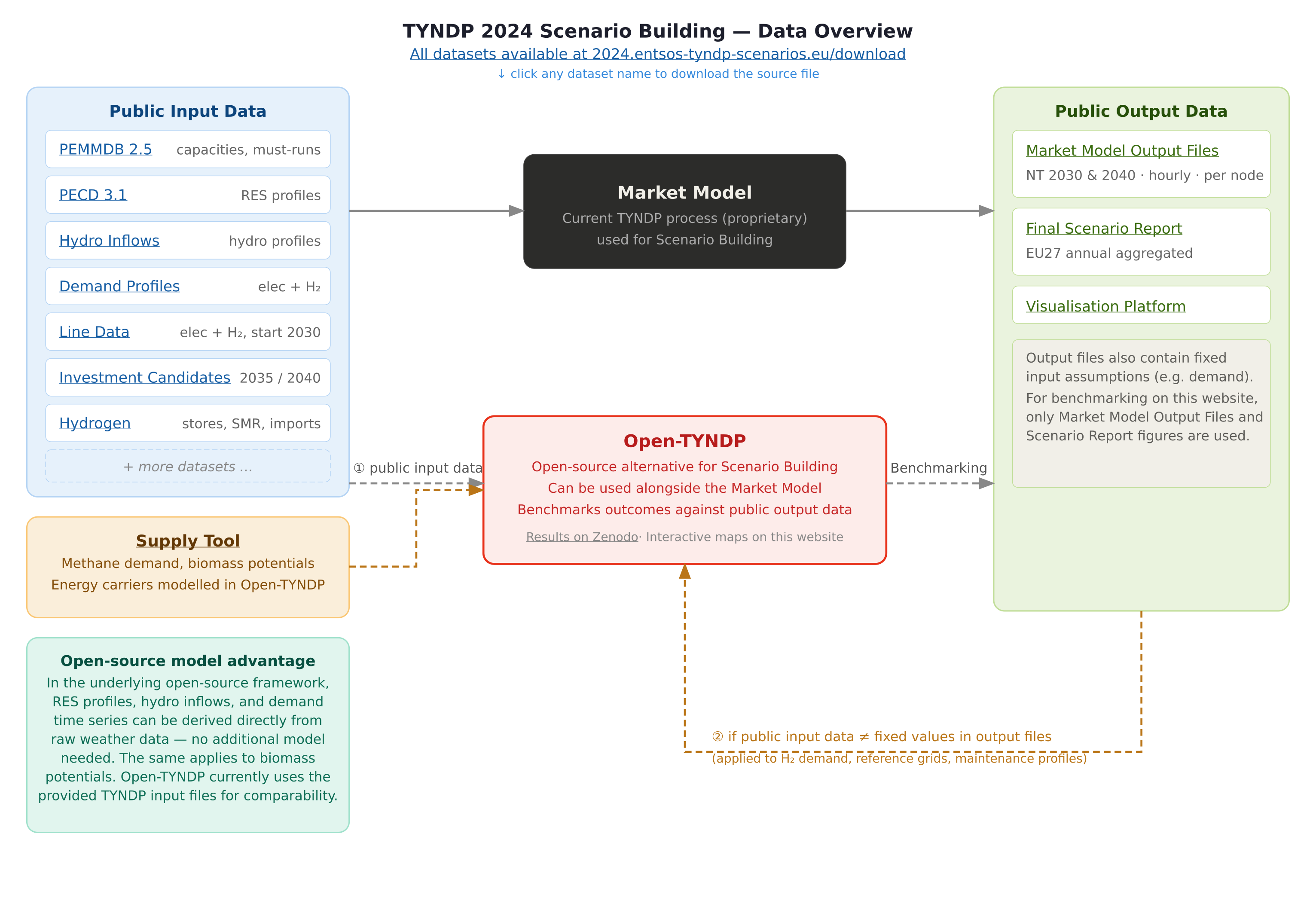
Public input data from ENTSO-E is used wherever available. Where publicly available data does not match the fixed values observed in the Market Model output files, the output files are used as the reference for fixed input assumptions. This applies strictly to exogenous variables that are not part of the optimisation (H₂ demand profiles, reference grid topologies, and generator maintenance profiles).
The following datasets are ingested and processed by dedicated build_tyndp_* Snakemake
rules:
- PEMMDB 2.5
Installed generation and storage capacities, must-run constraints, and per-unit cost assumptions by country and technology. Also provides efficiency and variable O&M parameters for conventional thermal generation sourced from ERAA 2025.
- PECD 3.1
Hourly capacity factor time series for wind (onshore and offshore) and solar PV, derived from ERA5 reanalysis data. Profiles are provided per climate year and TYNDP bidding zone.
- Hydro Inflows
Hourly inflow profiles for reservoir and run-of-river hydro plants, used to constrain hydro dispatch across planning horizons. Profiles are provided per climate year and TYNDP bidding zone.
- Demand Profiles
Hourly electricity and hydrogen demand profiles by country, interpolated to the target planning horizon. Where public profiles do not match fixed values in the Market Model output files, the output files are used as the reference.
- Line Data
Electricity and hydrogen transmission network topology for both the reference grid and candidate lines. Electricity and H₂ line data are used from 2030 onward.
- Investment Candidates
Optional extendable transmission and storage assets for the 2035 and 2040 planning horizons.
- Hydrogen
Hydrogen storage parameters, steam methane reforming (SMR and SMR+CCS) capacities, and import pipeline assumptions.
- Supply Tool
Methane demand and biomass potentials for energy carriers modelled in Open-TYNDP. This is a scenario output file from the TYNDP 2024 process used as a fixed input.
Note
In the underlying PyPSA-Eur framework, RES profiles, hydro inflows, and demand time series can be derived directly from raw weather data without any additional model. The same applies to biomass potentials. Open-TYNDP currently uses the provided TYNDP input files for comparability with the established TYNDP 2024 methodology.
SB Workflow#
The SB workflow transforms raw ENTSO-E input datasets into a solved, sector-coupled PyPSA network. The key stages are: integrating public input data, constructing the sector-coupled network, applying TYNDP-specific constraints, solving the capacity expansion optimisation, visualising results, and running the Open-TYNDP benchmarking framework.
Network Construction#
The PyPSA network is built at bidding zone / country-level resolution for the electricity and hydrogen sectors respectively. Buses represent national-level aggregations; AC lines and DC links represent cross-border interconnectors with capacities and impedances taken from the TYNDP Line Data.
Generator and storage components are attached to country buses using PEMMDB 2.5 capacity data. Which carriers are extendable varies by scenario and planning horizon.
Sector Coupling#
Open-TYNDP models the electricity and hydrogen sectors as fully coupled. For the Distributed Energy (DE) and Global Ambition (GA) scenarios, heating sector links are included in addition (see Open-TYNDP scenarios). Cross-sector components include:
Electrolysers: Convert electricity to hydrogen; capacity is either fixed per PEMMDB 2.5 or left extendable depending on the scenario.
Fuel cells and back-pressure plants: Reconvert hydrogen or gas to electricity.
Hydrogen network: Dedicated H₂ pipelines between country buses are included for planning horizons from 2030 onward, using TYNDP Line Data. Zones with split H₂ grids (e.g. the Iberian Peninsula) are represented with separate H₂ buses.
SMR and SMR+CCS: Grey and blue hydrogen production capacities from PEMMDB and TYNDP hydrogen datasets.
Demand-side electrification: Where the scenario specifies it, electricity demand incorporates direct electrification of heat and transport end-uses.
Capacity and Dispatch Optimisation#
The SB optimisation minimises total annualised system cost (variable operating cost, plus investment cost where capacity expansion is enabled) subject to:
Hourly supply-demand balance for each carrier at every bus.
Transmission capacity constraints, with optional extendability for candidate lines.
CO₂ emission budgets derived from the TYNDP 2024 scenario pathway.
Minimum and maximum generation constraints from PEMMDB, including must-run levels and scheduled maintenance outages.
Country-level annual hydrogen supply and demand balances.
Capacity expansion constraints reflecting given trajectories in the case of the DE and GA scenario
The problem is formulated as a linear programme (LP) and solved with the configured solver (HiGHS as default as an open-source alternative for lower temporal resolution runs; other solvers like Gurobi/Mosek are also supported and recommended for high-resolution runs).
Each planning horizon is solved independently using the capacity assumptions fixed for that
horizon. The solved network.nc file is retrieved by the CBA workflow as
its starting point. See the CBA documentation for details.
Configuration#
SB settings are split across config/config.tyndp.yaml (run-level settings) and
config/scenarios.tyndp.yaml (scenario-specific overrides). You can refer to
the configuration page for a more comprehensive list of available PyPSA-Eur
and Open-TYNDP configuration options.
Scenarios and Planning Horizons#
scenario: Selects the TYNDP 2024 scenario. Supported values areNT(National Trends),GA(Global Ambition) andDE(Distributed Energy).planning_horizons: List of target years to solve (e.g.[2030, 2035, 2040, 2050]). Each horizon is solved as an independent optimisation.run.name: Identifies the run and determines the output directory; typically set to the scenario/climate-year identifier (e.g.NT-cy2009). *launch_explorer: Whether to launch the PyPSA Explorer after the model solve within the workflow. Default isTrue.
Climate Years#
Each scenario run is tied to a specific historical climate year, which determines the renewable generation and hydro inflow profiles used from PECD 3.1 and Hydro Inflows:
snapshots: Defines the modelling time window, e.g.:snapshots: start: "2009-01-01" end: "2009-12-31" inclusive: "left"
atlite.default_cutout: ERA5 reanalysis cutout used to compute PECD-compatible capacity factor profiles (e.g.europe-2009-era5).
Solver Settings#
solving.solver.name: Solver to use (e.g.gurobi,highs, ormosek).solving.solver_options: Solver-specific parameters such as optimality gap and memory limits.
Data Sources#
By default, Open-TYNDP retrieves input datasets from data.pypsa.org (archive source)
or their original primary sources, meaning data is pulled from several different domains. As an alternative, most datasets are also mirrored to a
dedicated Google Cloud Storage bucket (open-tyndp-data-store) under the tyndp-archive
source. This mirror consolidates downloads to a single URL, which can simplify IT or security approval processes. The Google Cloud Storage requires no account and all files are versioned for reproducibility.
To activate tyndp-archive for all supported datasets, set data_config: tyndp in any
of the following ways:
Pass it on the command line:
$ pixi run tyndp -- --config data_config=tyndp
Set it permanently in
config/config.tyndp.yaml(applied to all TYNDP runs):data_config: tyndp
Set it in
config/test/config.tyndp.yamlfor test runs.
This loads config/data.tyndp.yaml, which switches all mirrored datasets to tyndp-archive.
A small number of datasets (wdpa, cutout, open_tyndp_prelim) are not yet available
on the GCS bucket and will still be retrieved from their respective sources.
To see which datasets support tyndp-archive, check the source column in data/versions.csv.
See also data_config and data in the configuration reference.
Running Scenario Building#
Before running, make sure you have completed the steps in the installation guide.
Scenarios are defined and modified in config/scenarios.tyndp.yaml. The full workflow from raw input data
through to results and launching the
PyPSA Explorer visualisation runs with a single command:
$ pixi run tyndp
Hint
If too many parallel jobs cause out-of-memory issues, you can specify your machine’s
physical RAM limit in profiles/default/config.yaml for Snakemake to use
when scheduling jobs:
resources:
  mem_mb: 16000