Cost-Benefit Analysis (CBA)
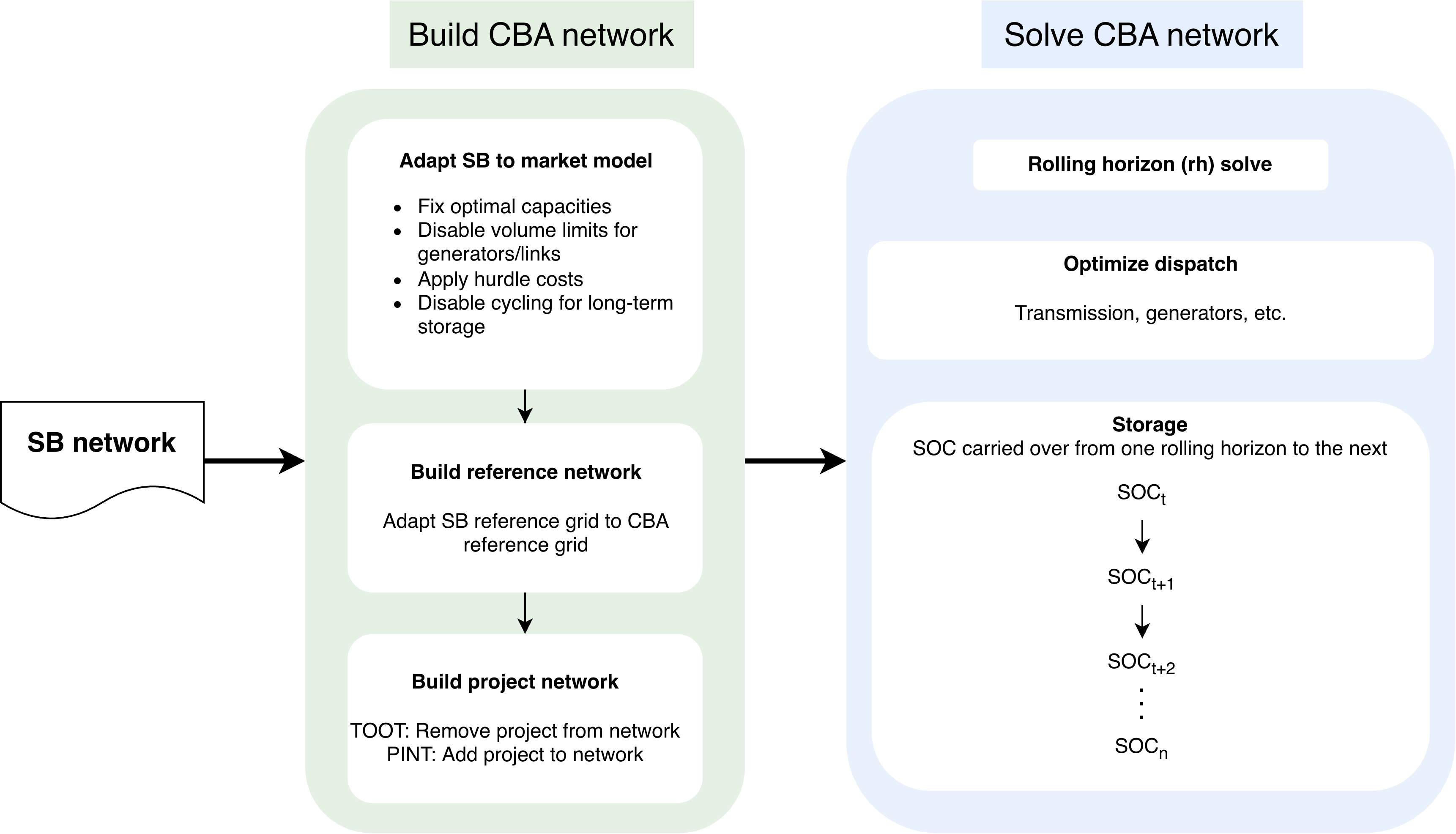
The Cost-Benefit Analysis (CBA) evaluates transmission and storage projects by comparing two dispatch-only simulations: a reference network (the baseline grid) and a project network (the grid with a specific project added or removed). Unlike the Scenario Building (SB) phase, the CBA does not re-optimize capacities; it reuses the SB's solved network, fixes capacities, and runs dispatch-only optimizations.
CBA Workflow Methodology
The workflow evaluates projects using a rolling horizon approach where the full year is divided into sequential weekly windows (168 hourly snapshots each, with an overlap of 1 snapshot). An overview of the CBA rules is documented at CBA rules.
To resolve myopia—where the optimizer cannot see beyond the current week and makes suboptimal decisions for seasonal storage (H2, gas, large hydro)—the workflow uses Marginal Storage Values (MSV) derived from a full-year optimization.
Network Simplification
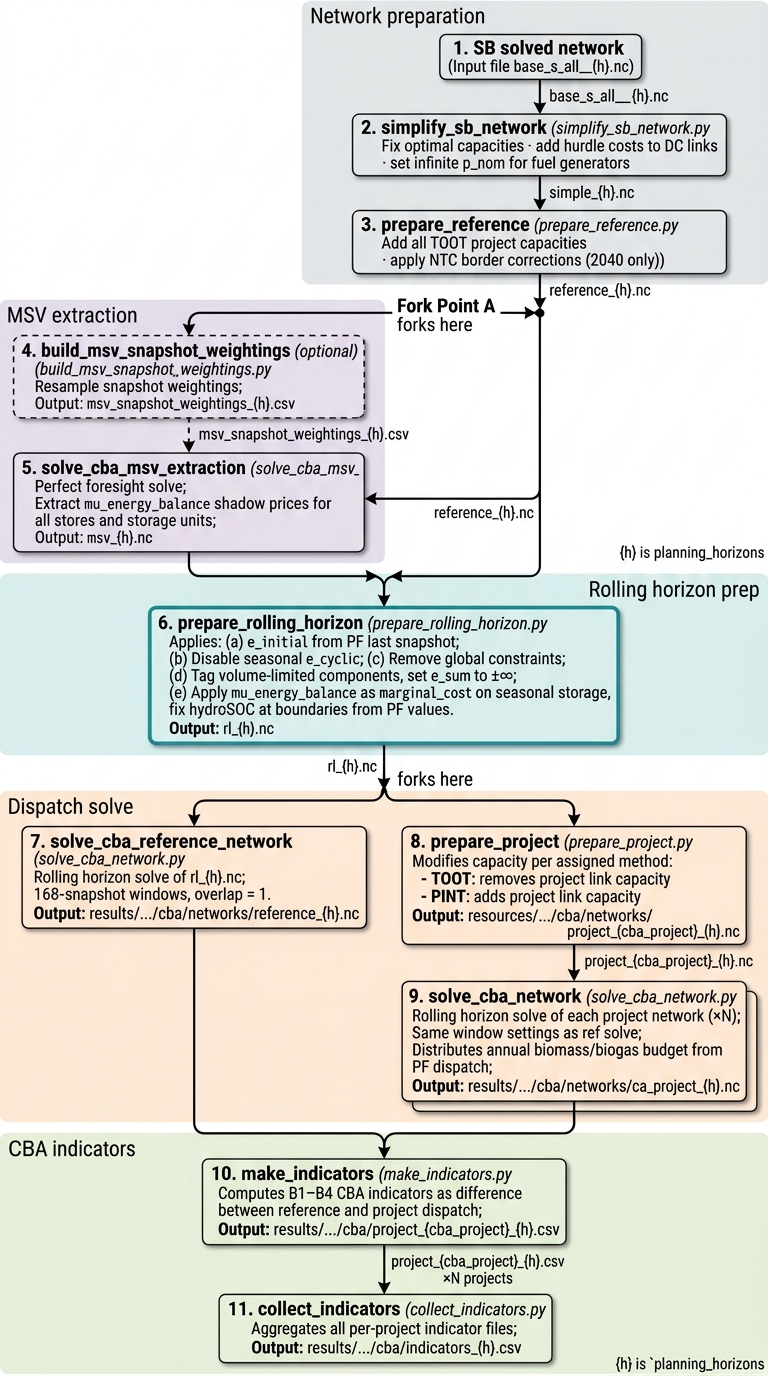
The SB network is transformed into a dispatch-ready CBA network:
- Fixed Capacities: Capacities are fixed via
n.optimize.fix_optimal_capacities(). - Hurdle Costs: A cost of 0.01 €/MWh is applied to all DC links.
- Fuel Capacities: Primary fuel generator capacities (coal, gas, oil, nuclear) are set to infinity to prevent dispatch from being artificially restricted by fuel-supply limits during peak hours.
Reference Network
The simplified network is extended to form the CBA reference baseline by adding all TOOT project capacities. This ensures the reference and MSV extraction operate on the same topology.
MSV Extraction
The reference network is solved with perfect foresight (entire year, single LP). This exposes the shadow prices (mu_energy_balance) of energy balance constraints, representing the Marginal Storage Value (MSV)—the opportunity cost of stored energy at that moment.
Rolling Horizon Preparation
The reference network and MSV results are combined through five transformations:
- (a) Initial storage state: Seasonal components have their initial state set to the perfect foresight solution's last-snapshot value.
- (b) Disable cyclicity: Short-term storage (battery) keeps cyclicity, while seasonal units (H2, gas, hydro) have it disabled, guided instead by MSVs.
- (c) Remove global constraints: Annual CO2 and biomass limits are removed as they cannot be enforced consistently in weekly windows.
- (d) Disable annual volume limits: Annual budgets for biomass/biogas are distributed proportionally to the perfect foresight dispatch.
- (e) Apply MSV: The
mu_energy_balancetime series is written into themarginal_costof storage components. - (f) Hydro Pinning: Large hydro reservoirs are pinned to their perfect-foresight state-of-charge values at window boundaries to guide dispatch where duals are near-zero.
Solve
The prepared network is solved for the Reference baseline and then for each Project. Projects are evaluated using either TOOT (Take Out One at a Time) or PINT (Put IN at a Time) methods.
CBA Indicators
Indicators are computed as the difference in system costs and emissions between the reference and project dispatch solutions.
- B1: Social Economic Welfare (SEW): Quantifies the change in operational system costs (socio-economic welfare).
- B2: Social costs of CO2 emissions: Calculates the impact using societal cost assumptions (low, central, high).
- B3: RES integration costs: Tracks changes in renewable capacity, generation, and avoided curtailment.
- B4: Non-direct greenhouse emissions: Quantifies pollutants (NOx, SO2, PM, etc.) using fuel consumption multipliers.
Configuration
CBA settings are defined in the cba section of the configuration file. You can refer to
the configuration page for a more comprehensive list of available PyPSA-Eur
and Open-TYNDP configuration options.
Project Selection
planning_horizons: Selects horizons (e.g., 2030, 2040).projects: Defines project identifiers (e.g.,t1-t35).cba_scenario_input: Ifuse_presolvedis true, the workflow retrieves pre-solved SB networks from an archive.
Rolling Horizon Settings
storage.cyclic_carriers: Carriers that remain cyclic within each weekly window.storage.soc_boundary_carriers: Carriers pinned at window boundaries.msv_extraction.resolution: Controls temporal resolution for the MSV solve (e.g.,24H).
Running Single vs Multiple Climate Years
Climate-year collections allow project benefits to be assessed across multiple weather years, consistent with the 2024 TYNDP implementation.
The CBA entry point pixi run tyndp-cba can run a single scenario that is one single climate year or a collection scenario that defines a list of child (climate years) scenarios under cba.scenarios.
Example Collection (config/scenarios.tyndp.yaml):
NT-cy1995:
#  <<: *cba-common
snapshots:
    start: "1995-01-01"
    end: "1996-01-01"

atlite:
    default_cutout: europe-1995-sarah3-era5

cba:
    sb_scenario: NT


NT-cy2008:
#  <<: *cba-common
snapshots:
    start: "2008-01-01"
    end: "2009-01-01"

atlite:
    default_cutout: europe-2008-sarah3-era5

cba:
    sb_scenario: NT


NT-cy2009:
#  <<: *cba-common
snapshots:
    start: "2009-01-01"
    end: "2010-01-01"

atlite:
    default_cutout: europe-2009-sarah3-era5

cba:
    sb_scenario: NT

NT-cyears:
  cba:
    scenarios: [NT-cy2009, NT-cy2008, NT-cy1995]
Individual child scenarios (e.g., NT-cy2009) must define their specific snapshots, atlite.default_cutout, and the cba.sb_scenario used as input.
Tip
If too many parallel jobs cause out-of-memory issues, you can specify your machine's
physical RAM limit in profiles/default/config.yaml for Snakemake to use
when scheduling jobs:
resources:
  mem_mb: 16000
Running Multiple Years
To run a collection like NT-cyears, modify run.name in config/config.tyndp.yaml or override it via command line:
$ pixi run tyndp-cba --config run='{"name":"NT-cyears"}'
Running a Single Climate Year
Similarly, a single climate year can be run by modifying run.name in config/config.tyndp.yaml to the desired scenario (e.g., NT-cy2009) or overriding it via command line:
$ pixi run tyndp-cba --config run='{"name":"NT-cy2009"}'
Checkpoint
If you run the CBA workflow for the first time, you might not see a full DAG and instead only see a small number of steps listed in your DAG (including a step called clean_projects).
This rule represents a checkpoint in the workflow that first checks how many projects are being asked to run before building out the full DAG. Specifically, the checkpoint tells the workflow which CBA projects exist, which project IDs to run, and which method applies (TOOT/PINT).
Thus, if you see only a few steps in your DAG, it is because Snakemake has not yet reached the checkpoint to determine the full list of projects to evaluate. This short DAG is therefore not reflective of the actual number of steps that will run once the checkpoint is passed.
After clean_projects finishes and the checkpoint passes, Snakemake can read the cleaned CSV and expand the DAG into concrete jobs, at which point you will see the full set of steps.
To run the workflow only up to the checkpoint, one can use the pixi run tyndp-checkpoint command, which executes all steps up to and including the checkpoint.
$ pixi run tyndp-checkpoint
After this, you can run the full workflow with pixi run tyndp-cba to execute all remaining steps, including those that follow the checkpoint.